For property management
Turn units faster.
Prove every job.
Turnovers, work orders, and recurring inspections with photo proof — across your whole portfolio, with completion reports you can export any time.
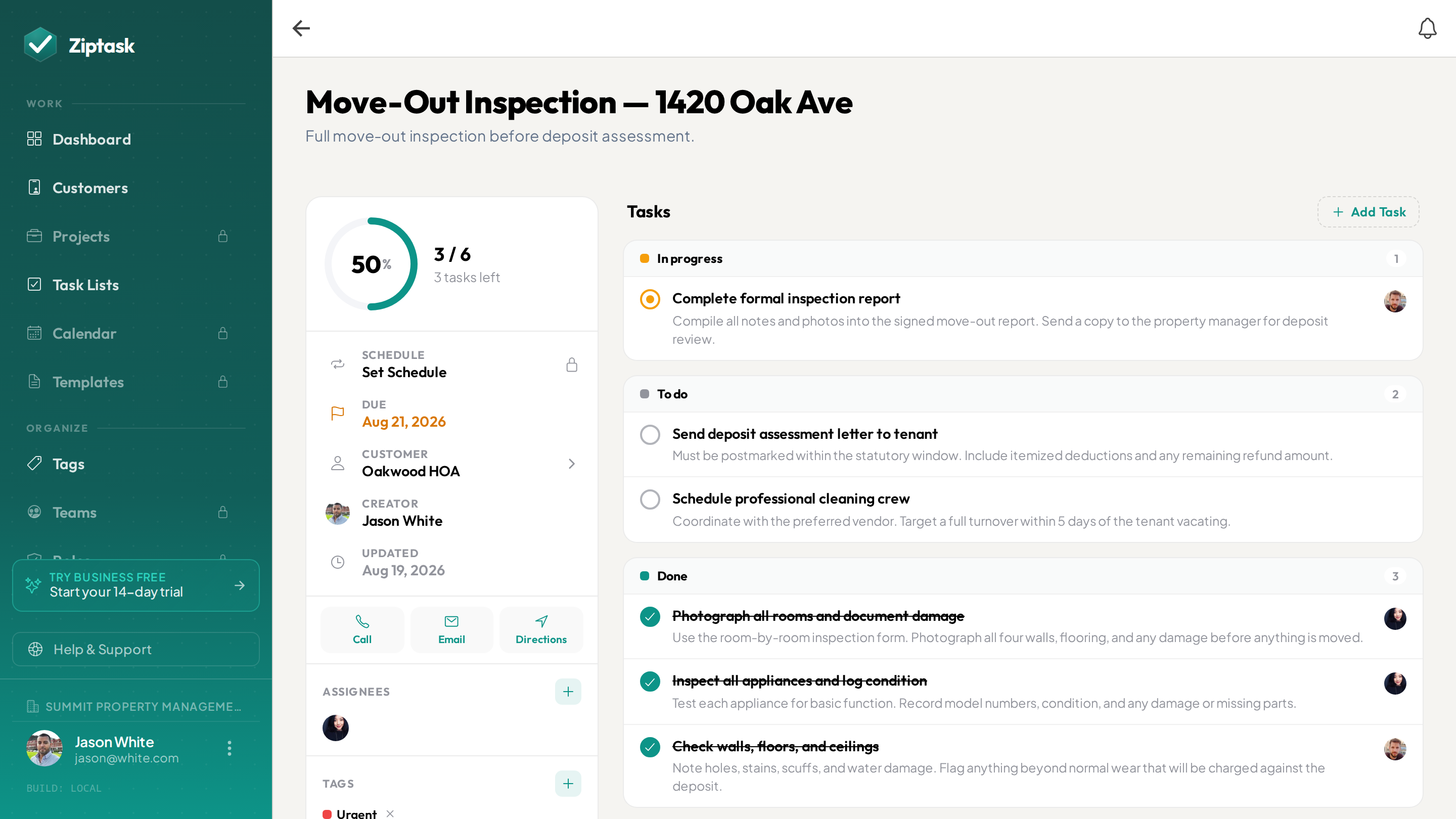
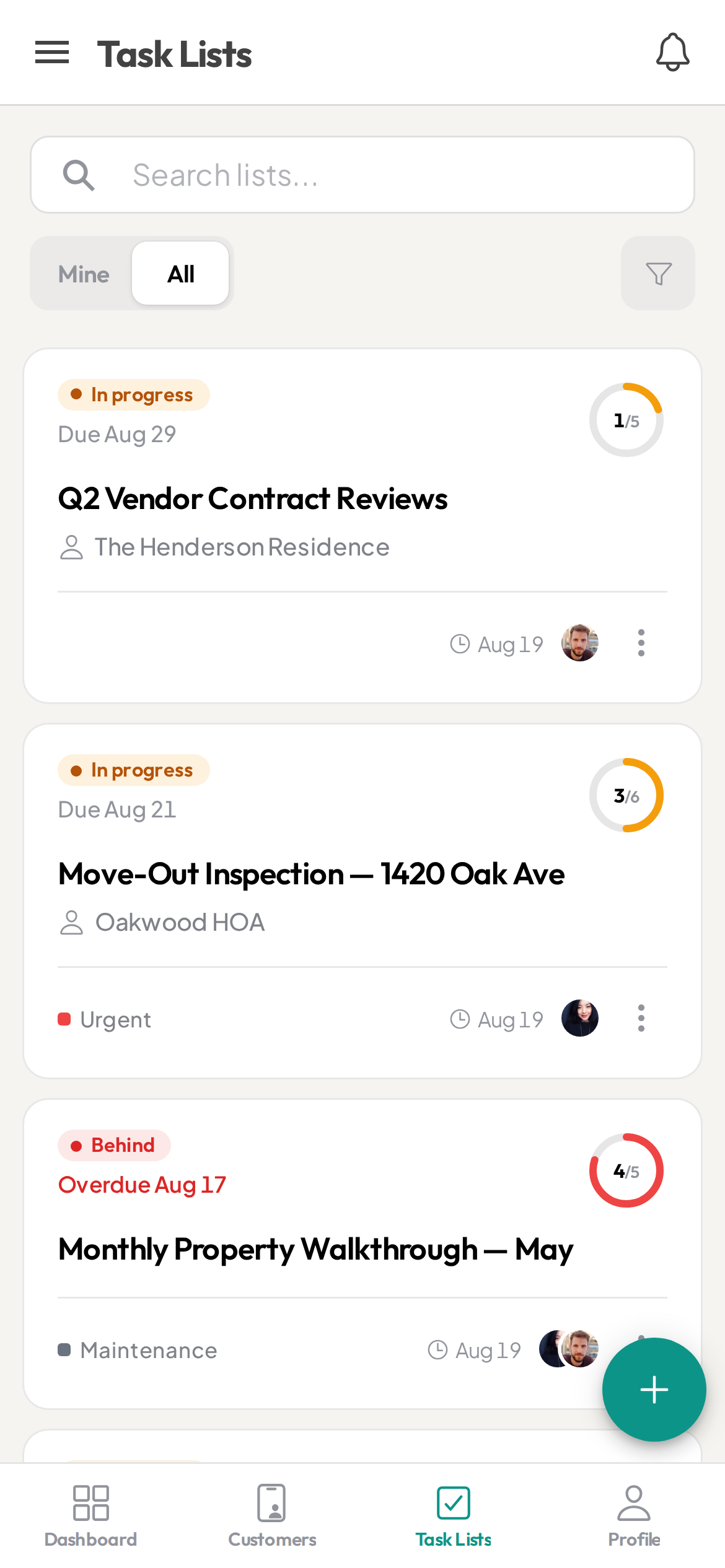
Every unit, every vendor, every owner — in your inbox.
- Turnovers slipping because no one’s tracking the make-ready
- Maintenance requests lost in email and text threads
- No proof of unit condition at move-in / move-out — deposit disputes
- Owners asking for updates you scramble to put together
- On-site staff and vendors you can’t keep accountable across properties
Everything a property team needs
Start free, then unlock more as you scale. see pricing.
Move-in / move-out photo proof
StarterDocument unit condition with required photos at every turn. Protect deposits, settle disputes, and give owners a clear before-and-after record.
Recurring property inspections
StarterSchedule routine common-area, safety, and preventive-maintenance checks that regenerate automatically — nothing falls through the cracks.
Reminders before a turn is due
Ping the make-ready crew the day before a unit is due, or a regional manager a week before an inspection — by push and in-app, to everyone or just the people you pick.
Call them properties, not customers
NoneBy default Ziptask calls the people you work for “customers.” Switch your account to Properties (or Locations) in one tap, and the menu, forms, and calendar connections say it your way.
Turns on your calendar
See unit turns and inspection due dates in your own calendar app, kept in sync automatically — no logging in to know what's due.
Sign off before a unit is rent-ready
StarterRequire a manager to review and approve a make-ready or work order before it closes — so “rent-ready” actually means ready.
Maintenance work orders, tracked
Turn a request into an assigned work order in seconds, route it to the right tech or vendor, and watch it close out in real time.
Standardized turnover checklists
Save your make-ready and inspection checklists as templates so every unit gets turned the same way, regardless of who does it.
A team for your staff
ProAssign each list to a team — on-site staff see only their team’s work, while regional and portfolio managers see everything at once.
Completion reports, exportable
ProSee completion rates and list status across the portfolio, filter by date, and export to CSV — the numbers behind your owner updates, without digging them out by hand.
See a turn’s progress in dollars
ProSet a labor rate per hour and group a unit’s work under a project — Ziptask turns completed effort hours into estimated vs. earned value, a quick read on where a turn stands. It’s a hours-based estimate, not cost accounting. Prefer “Jobs”? Switch the name in your account settings and the menu, reports, and help follow.
An audit trail per unit
ProA timestamped record of every inspection and repair on every unit — your backup for owners, disputes, and compliance. Export to CSV.
Staff hours, property by property
ProMaintenance staff and cleaners clock in on the job and pick the list they are working on. See the hours each property takes, and approve the week when it is done.
Run every turn the same way
Log the work
Spin up a turnover, inspection, or work order from a template and assign it to on-site staff or a vendor — in seconds.
Staff document on-site
They photograph unit condition, complete each item, and submit from their phone. Progress shows up live for the manager.
Sign off & report
Approve when the unit is rent-ready, and hand owners a clean, timestamped record of exactly what was done.
Property management FAQ
Can I document unit condition at move-in and move-out?
Yes. Require a photo on inspection tasks before they can be submitted, with a manager sign-off before the task closes, so every unit’s condition is recorded at turn — protecting deposits and settling disputes with proof.
Can I track maintenance work orders?
Yes. Assign work orders to on-site staff or vendors and track them to completion in real time across web, iOS, and Android.
Can inspections repeat automatically?
Yes. Recurring lists regenerate routine inspections and preventive-maintenance checks on a daily, weekly, or monthly schedule with items reset.
Can staff only see their own work?
Yes. Assign lists to a team, and on-site staff see only their team’s work, while regional and portfolio managers see everything.
Can I see a turnover’s progress in dollars?
Yes, on the Pro plan. Set a labor rate per hour and group a unit’s lists under a project; Ziptask shows estimated vs. earned value as work gets done. It’s a hours-based estimate of progress — not full cost accounting, so it doesn’t track materials, labor hours, or invoices.
What is the best app for property management tasks and inspections?
Look for recurring inspection and maintenance checklists, photo proof on turns and work orders, team-based access for on-site staff, and real-time tracking for regional and portfolio managers. Ziptask covers all of these on iOS, Android, and web, and is free to start.
Can I keep an inspection and maintenance record for each unit?
Yes. Every completed task is timestamped with its photos in the activity log, giving you a per-unit history of inspections and maintenance you can hand to owners or use to settle a dispute. The Pro plan adds CSV export.
Can I track my maintenance staff’s hours?
Yes, on the Pro plan. Your crew clocks in and out from the phone (it works with no signal and syncs later), takes breaks, and fixes a forgotten clock-out with a reason. Each week becomes a timesheet that a manager approves, and you can export hours for payroll as a CSV or as a file for Gusto, ADP RUN or QuickBooks Online Payroll.
How much does it cost?
Ziptask is free to start. Paid plans (Starter, Pro) add photo proof, recurring inspections, teams, owner reporting, project value tracking, and an audit trail as your portfolio grows.