For landscape design/build
Every install,
dirt to done.
Phase checklists, before/after photo proof, and final walkthrough sign-off — so every install goes in right, and you’ve got the pictures to prove it (and post).
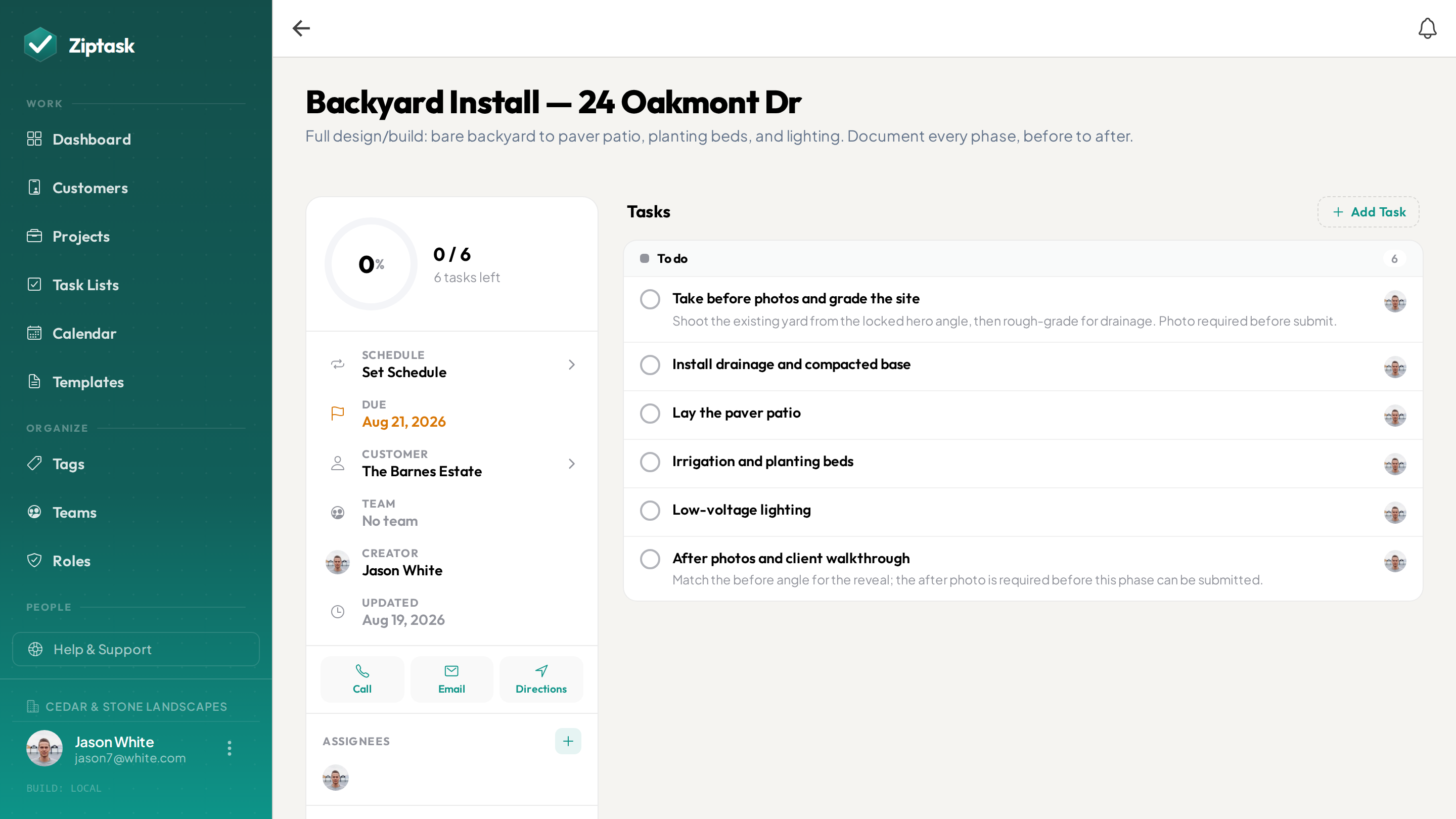
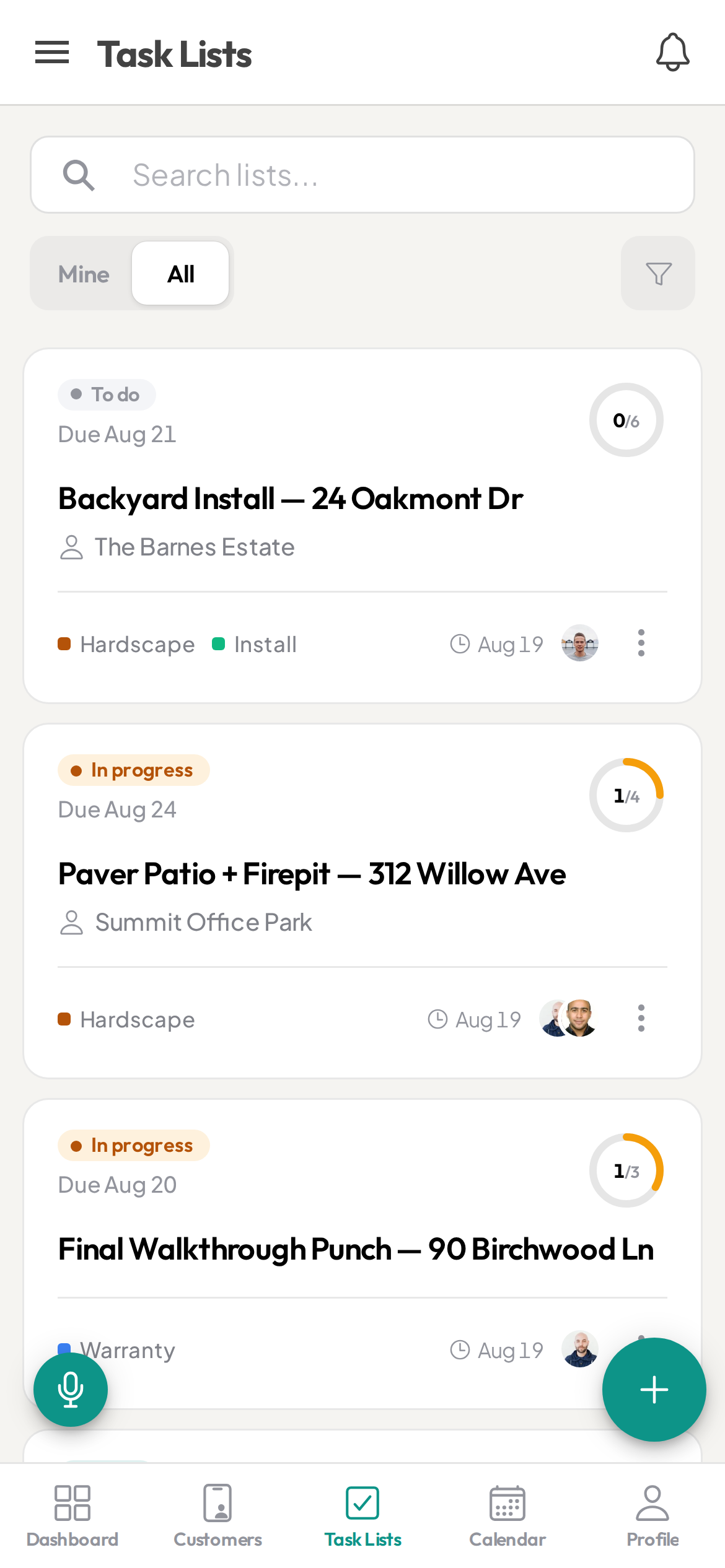
The install went in. The photos? Somewhere.
- The build sequence lives in the foreman’s head, not on paper
- No before/after photos when a client asks what they paid for
- Crews spread across sites you can’t see from the shop
- Walkthrough punch items that slip through before final
- Change orders agreed on a handshake — nothing to point back to
Everything an install needs — nothing it doesn’t
Start free, then unlock more as you scale. see pricing.
Before/after photo proof
StarterRequire a photo before a phase can be submitted. Every install ends documented — before/after proof to show the client, and shots that are yours to reuse in your portfolio.
Your build sequence, saved
StarterSave your standard sequence — grading, drainage, hardscape, irrigation, planting, lighting — as a template so every install starts from the same proven steps instead of the foreman’s memory.
Lead / designer sign-off
StarterAdd an approval gate so a phase only closes after the crew lead or designer signs off — catch a bad base or drainage issue before it’s buried under the next phase.
Establishment & warranty checks
StarterPost-install watering-in and warranty walks build themselves — set the checklist to repeat weekly, biweekly, or monthly and Ziptask spawns a fresh copy each time, with a photo record for warranty claims.
Walkthrough punch lists
Turn the final walkthrough into a punch list on the spot, assign items to the right crew, and close them out before the client ever sees them.
Every job tied to the client
Attach each install to the customer it's for, then pull up that client to see every job you've done for them — this install, the maintenance visits, the warranty walks — in one place. Create a customer in a tap; on every plan.
A team for each crew
ProAssign each install to a team, and that crew sees their site — one team per crew. You and the designers see every job across the company.
See an install’s progress
BusinessGroup an install’s phase lists under a project and set a rate per effort point — Ziptask turns completed points into estimated vs. earned value, so you can see how far along a job is. It’s a points-based progress estimate, not job-cost accounting — it doesn’t track materials, labor, or invoices.
Dictate the punch list on site
BusinessWalking the yard at final with gloves on? Speak the punch items aloud and Ziptask builds a structured, assignable list — no typing with dirty hands.
A full audit trail
BusinessEvery action on every list is logged with who did it and when — your record for warranty claims, change-order disputes, and callbacks. Export to CSV.
No signal on the lot? No problem
New builds and rural sites rarely have signal. Crews keep working the phase checklist and checking off items with no connection — everything syncs the moment they’re back in range. (Uploading photos needs a connection.)
From first cut to final walkthrough
Plan the build in phases
Spin up the phase checklist — grading, hardscape, irrigation, planting, lighting — from a template, or dictate it standing on site. Assign each phase to the right crew.
Crews work — and shoot — each phase
Workers pick up items, snap the required before/after photo, and submit. Progress shows live for you and the designer — no drive-bys to check status.
Walk it, sign off, hand over proof
Turn the final walkthrough into a punch list, close it out, and keep a documented record of every phase — with the before/after shots to walk the client through and reuse in your marketing.
Landscape design/build FAQ
Can I require a photo before a phase is marked done?
Yes. On any task you can require a photo or document before it can be submitted, and add a crew-lead or designer approval step before the phase officially closes — so every install is documented as it goes in.
Does it work on phones out on the job site?
Yes — Ziptask has native iOS and Android apps plus a web app, with real-time sync and push notifications so the shop and the crew stay in step, even on remote lots.
Can I reuse the same build sequence on every install?
Yes. Save your standard phase sequence — grading, drainage, hardscape, irrigation, planting, lighting — as a template and start any new install pre-populated with your proven steps. Recurring lists handle establishment and warranty walks automatically.
Can different crews see only their own sites?
Yes. Create a team for each crew and assign installs to it. That crew sees its own jobs, while you and your designers see every project across the company.
Can I see how far along an install is?
Yes, on the Business plan. Group a job’s phase lists under a project and set a rate per effort point; Ziptask shows estimated vs. earned value as phases complete. It’s a points-based estimate of progress — not full job-cost accounting, so it doesn’t track materials, labor hours, or invoices.
What is the best photo-proof and checklist app for landscape design/build?
The right tool lets you save your build sequence as a reusable checklist, require photo proof before a phase closes, add a crew-lead or designer sign-off, and scope each install to its crew using teams. Ziptask does all of this on iOS, Android, and web, and is free to start.
Can I document the final walkthrough and punch list?
Yes. Turn the walkthrough into a punch list, assign items to the right crew, require a photo on the ones that matter, and keep a timestamped record you can pull up for a warranty claim or to walk the client through what was done.
How much does it cost?
Ziptask is free to start. Paid plans (Starter, Pro, Business) add photo proof, approvals, recurring lists, teams, project progress tracking, and more as your crews grow.