Calendar import
Every booking gets
its own checklist.
Paste your Airbnb, Vrbo, Booking.com, Google or Outlook calendar link. Ziptask creates a checklist for each booking ahead of time, so your crew knows about every turnover before the guest does.
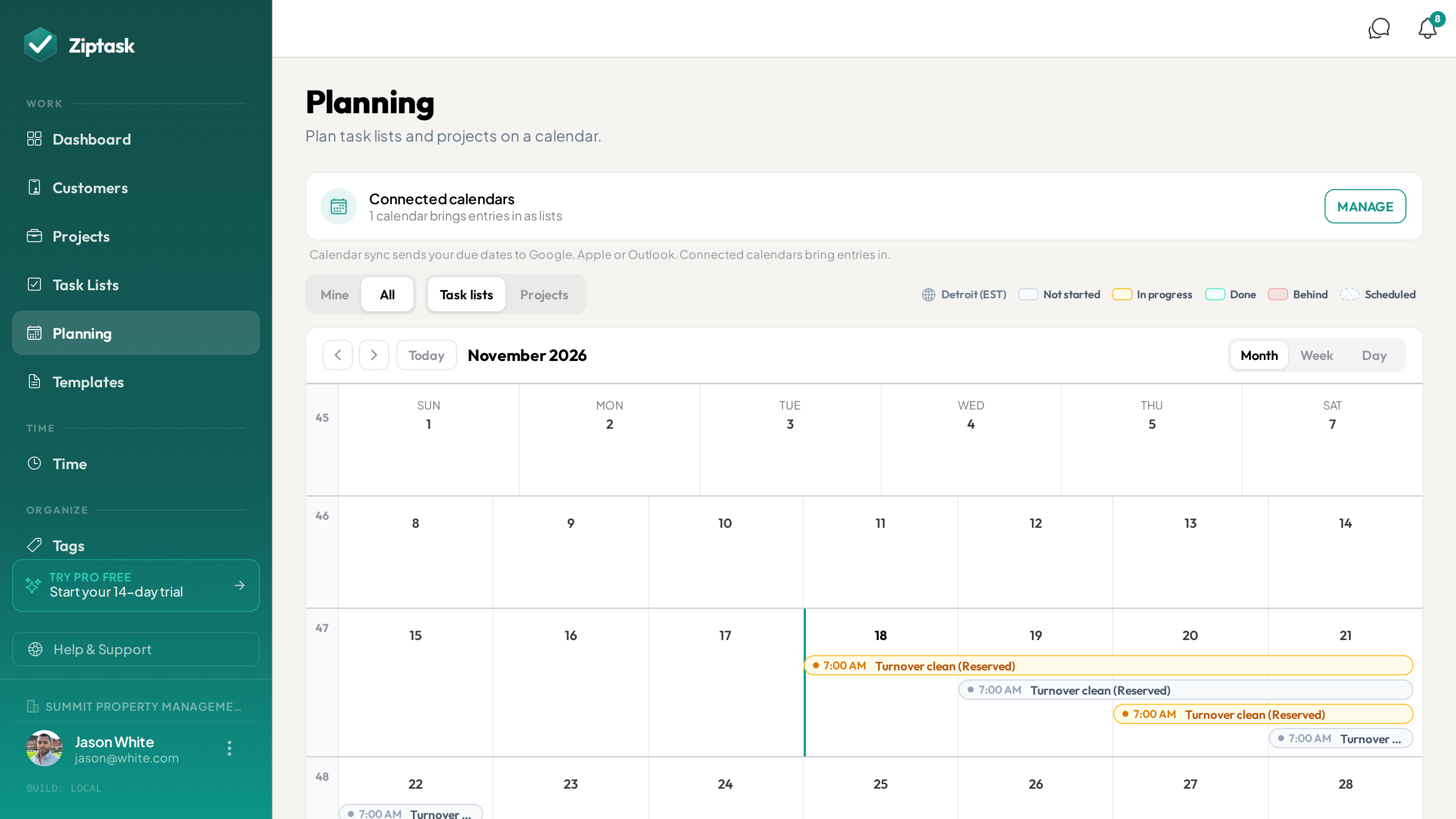
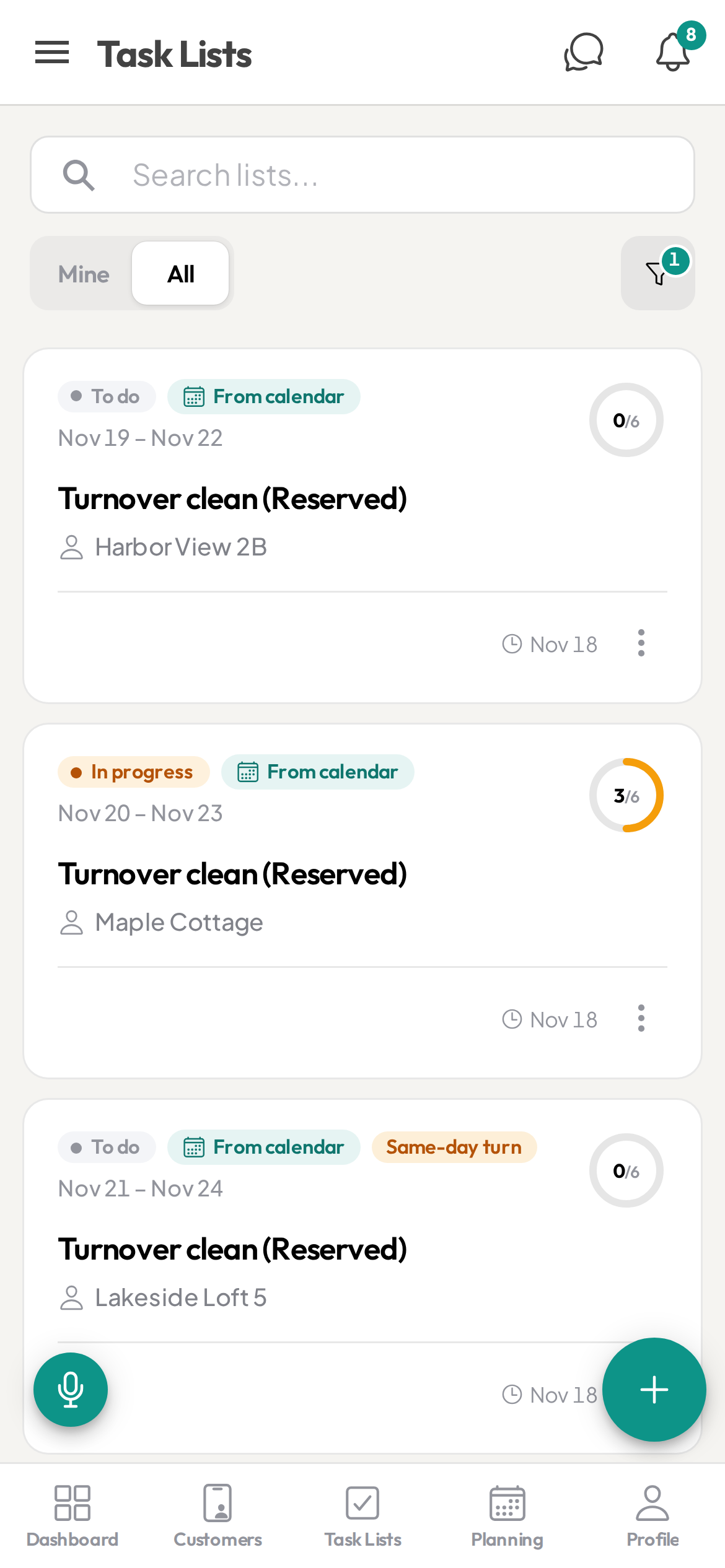
The booking is in one place and the cleaning is in another.
- Copying bookings from Airbnb into a spreadsheet or a group chat
- A same-day turn nobody noticed until the next guest was at the door
- Cleaners asking which units need doing, and when
- A cancelled booking that still leaves a cleaning on someone’s list
- The same checklist rebuilt by hand for every stay
Everything between a booking and a clean unit
Calendar import is part of the Starter plan, and every new account can try it free. see pricing.
Works with your booking calendars
StarterConnect Airbnb, Vrbo, Booking.com, Google or Outlook with the calendar’s iCal link. Each listing has its own link, so one account can cover every property.
Your checklist, every booking
StarterPick the checklist to use and who it goes to. Add more than one list to a calendar, for example a turnover clean and a pre-arrival inspection, each with its own people and timing.
Lists arrive ahead of time
StarterChoose how far ahead each list appears, from the day of the booking to 30 days before. Rental lists are due at check-out by default, in your account’s timezone.
Same-day turns are flagged
StarterWhen another guest arrives the day one leaves, the list says so, so the crew sees the tight window before they arrive.
Changes follow the booking
StarterWhen a booking moves, its list moves with it. When it is cancelled, an untouched list is archived and a list someone has started stays open, both labeled Canceled.
Assigned to the right person
Choose who each list goes to when you connect the calendar, or leave it for the whole crew. Cleaners see their own work on their phone.
Photo proof on every turnover
StarterCrews photograph each area before they finish, so you can show an owner or a guest that a unit was ready.
Tied to the property
Every list can belong to a property or customer, and you can call them Properties, Locations or Rooms. One calendar can also serve several customers, matched by the event title.
Works in basements and dead zones
Crews keep working the checklist with no signal. Everything syncs the moment they reconnect.
Connect once, then it runs itself
Connect the calendar
Paste the iCal link from Airbnb, Vrbo, Booking.com, Google or Outlook, then choose your checklist and when each list should be due.
Lists appear on their own
A check runs about every 15 minutes. A list is created when its lead time arrives, with your checklist, your crew and the property already attached.
Your crew cleans, you see it done
They work the checklist on their phone, add photos and mark it complete. If the booking changes, the list follows.
Calendar import FAQ
Which calendars does it work with?
Airbnb, Vrbo and Booking.com listings, and Google and Outlook calendars, using each calendar’s iCal link.
Do you need my Airbnb password?
No. You only paste the calendar’s iCal link from the listing’s calendar settings. Ziptask stores the link encrypted and never shows it again after you save it. Treat it like a password, because anyone who has it can read the calendar.
How quickly do lists appear?
A background check runs about every 15 minutes, and a list is created when its lead time arrives. You can also tap Sync now to check right away.
What happens when a guest cancels or changes dates?
If the dates change, the list moves with the booking. If the booking is cancelled and nobody has started the list, it is archived and labeled Canceled. A list someone has already started stays open and shows the same label.
Can I create more than one checklist for each booking?
Yes. Add more than one list to a calendar, for example a turnover clean and a pre-arrival inspection, each with its own checklist, people and timing.
Which plan includes it?
Calendar import is part of the Starter plan and above. New accounts can try every feature free for 14 days with no credit card.
Is this the same as syncing Ziptask to my calendar?
No. Calendar import brings bookings in to create lists. Calendar sync does the opposite: it sends your Ziptask due dates out to Google, Apple or Outlook as a read-only feed, on every plan.